
Maan Win Withdrawal: How To Withdraw Money Step By Step
A Maan Win withdrawal sends money from your Withdrawable balance to a bank account, UPI ID, USDT address or ARPay wallet. The minimum is ₹110 for bank and UPI, ₹100 for ARPay and ₹1,000 for USDT, and each method allows 3 requests a day.
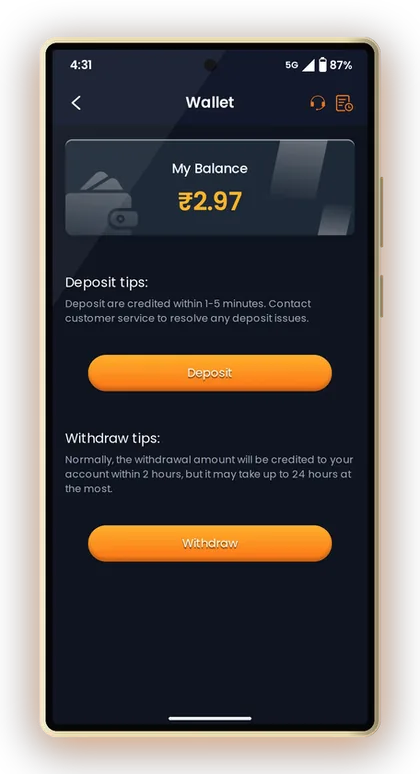
The Wallet page says money normally arrives within 2 hours, though it can take up to 24 hours. Most delays come from small things you can avoid: a wrong IFSC, a betting requirement that is not finished, or typing your full Cash Balance instead of the Withdrawable amount.
Below are the exact steps, the limits for each method, the right method for different amounts, and what to do when a request gets stuck.
Page Contents
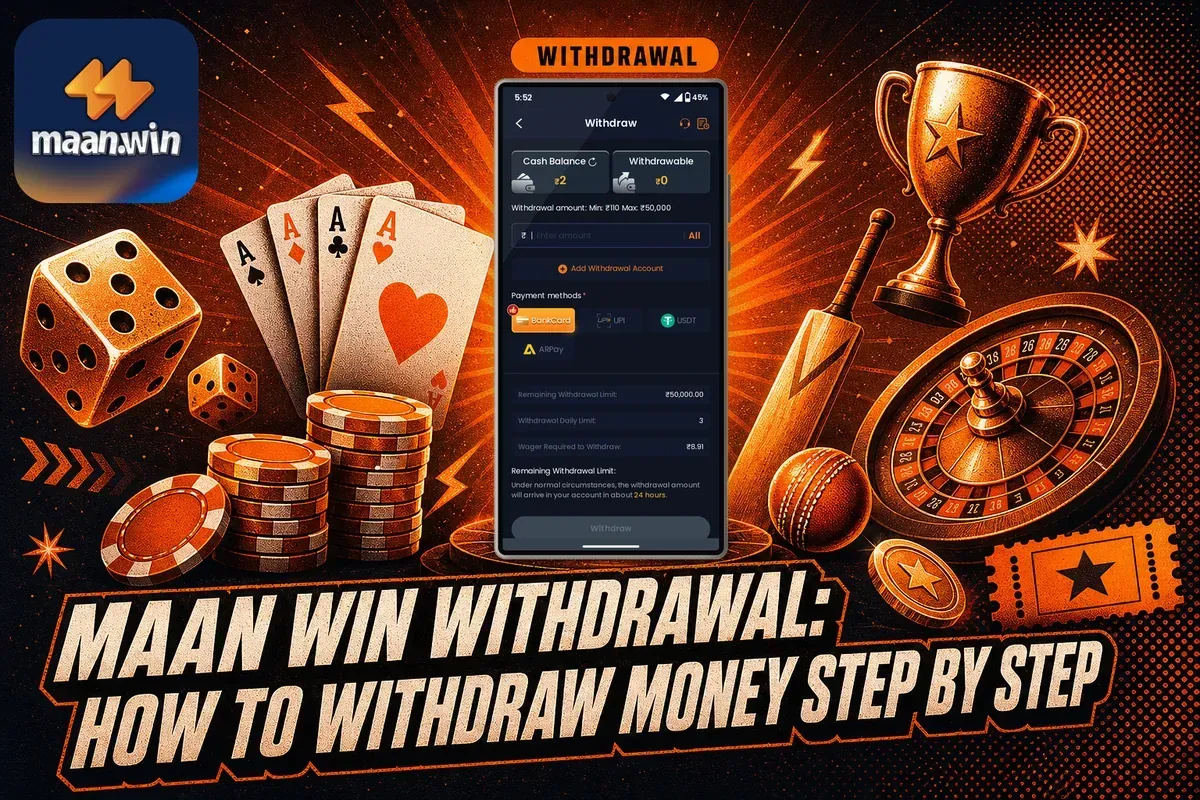
- Minimum Withdrawal
- ₹110 (UPI and bank)
- USDT Minimum
- ₹1,000
- Maximum Per Request
- ₹50,000 (UPI, bank, ARPay)
- Requests Per Day
- 3 per method
- Withdrawal Time
- Usually 2 hours, max 24
- Payment Methods
- Bank, UPI, USDT, ARPay
How Maan Win Withdrawal Works Before You Tap Withdraw
Every withdrawal starts from the Withdraw button under Your Balance on the homepage, or from the Wallet page. Both open the same withdraw screen, where you choose a method, add your account details and enter an amount.
First, you must hold an active account. If you haven't registered yet, go to the Maan Win home page, sign up using your +91 mobile number, and type PUWFKWN into the Invite Code box. Registration on the Maan Win register screen is rejected without an invite code, so have it handy before you begin.
Cash Balance vs Withdrawable
The withdraw screen shows two numbers: Cash Balance and Withdrawable. Cash Balance is all the money in your wallet. Withdrawable is the part you are allowed to send out right now.
New players often type their full Cash Balance and then wonder why the request fails. Tap the All button instead of typing. It fills in the amount for you and removes the chance of a typing mistake.
The Betting Requirement Line
Just above the Withdraw button you will see a line that shows how much you still need to bet before you can withdraw. On most real-money gaming apps, deposited money and bonus money must be played through before it becomes withdrawable.
If this figure is above zero, that part of your balance is locked. Check it every time you claim an offer from the Maan Win bonus section, because extra bonus money often adds to the amount you must bet.
Daily Limit and Remaining Limit
Two more lines show the Withdrawal Daily Limit and the Remaining Withdrawal Limit. Each method allows 3 withdrawals a day, so one planned request is better than three small ones made in a hurry.
Handy Tip: Open the withdraw screen right after your first deposit and note the betting requirement, so you know your target before you play a single round.
How To Withdraw Money From Maan Win App: Step By Step
The process takes about a minute once your withdrawal account is saved. The first time is slower because you must add your bank, UPI, USDT or ARPay details before you can send money to that method.
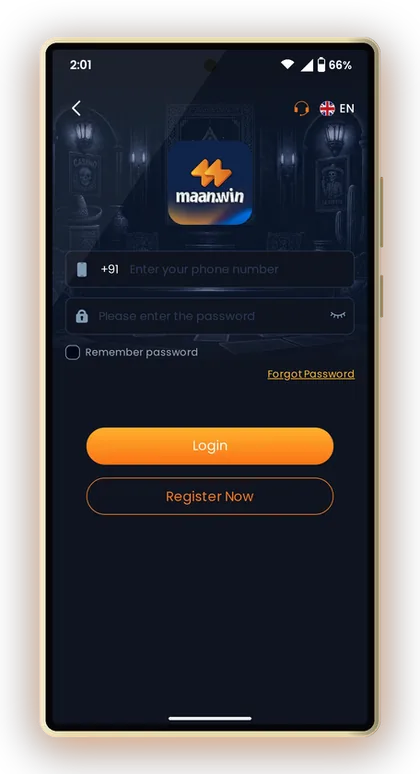
If you cannot get into your account, reset your password from the Maan Win login page with Forgot Password first. Do not create a second account to get around a login issue, because your balance stays with the original number.
Follow the steps in order. Skipping the check in step 5 is the most common reason a request does not go through.
- Launch the Maan Win app or the mobile site, then sign in using your +91 mobile number along with your password.
- Tap Withdraw under Your Balance on the homepage, or open Profile and tap Withdraw.
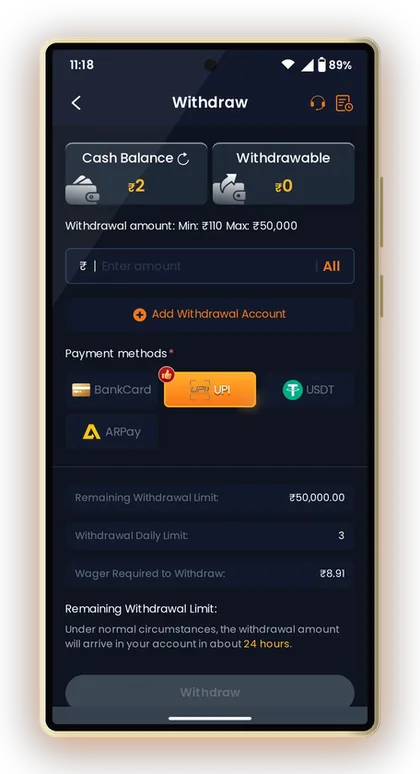
- Choose a payment method: BankCard, UPI, USDT or ARPay.
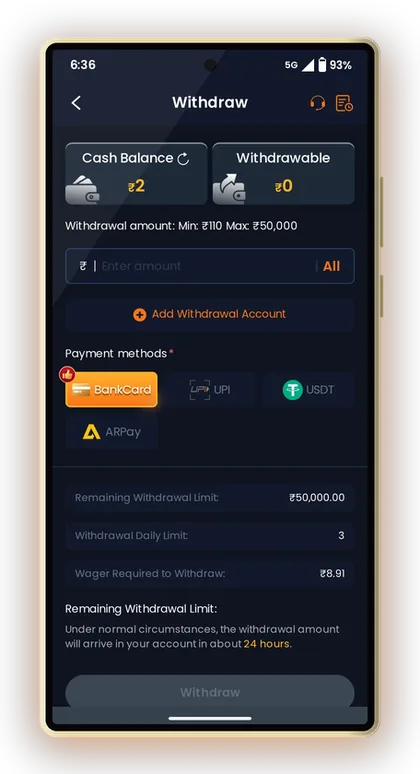
- If this is your first time with that method, tap Add Withdrawal Account and save your details carefully.
- Check the Withdrawable figure and make sure the betting requirement line shows nothing left to bet.
- Enter the amount or tap All, keeping it between the minimum and maximum shown for that method.
- Tap Withdraw to send the request.
- Check your Wallet or Balance Record later to follow the status of the request.
Handy Tip: Do not tap Withdraw again because the request looks slow; each extra request uses one of your 3 daily chances.
Adding A Withdrawal Account: Bank, UPI, USDT And ARPay
Tap Add Withdrawal Account on the withdraw screen to save where your money should go. Treat this step seriously, because changing details later means sending a request through Self Service and waiting for it to be reviewed.
Customer Care has an FAQ section with individual guides named How to Add Bank Account, How to Add UPI Account and How to Add USDT. If you are confused about any field, go through the guide for the payout method you picked.
Bank Account (BankCard)
Enter the account holder name, account number and IFSC exactly as they appear in your passbook or bank app. A single wrong digit in the IFSC is enough to hold up a withdrawal.
Use an account in your own name. If the name on the account does not match your details, the bank side can reject the transfer and the money may take longer to come back.
UPI ID
Bind the UPI ID you actually use every day, from PhonePe, Google Pay, Paytm or any other UPI app. Copy it from the app instead of typing it, since UPI IDs are easy to mistype.
If you later change phones or close that bank account, you will need the Delete UPI and Rebind option in Self Service. Choosing a stable UPI ID now saves that trouble.
USDT Address
Paste your USDT wallet address and check the first and last few characters before saving. Crypto transfers sent to a wrong address usually cannot be reversed.
Make sure the address belongs to the same network the screen asks for. Old addresses can be replaced with Delete Old USDT Address and Rebind.
ARPay Wallet
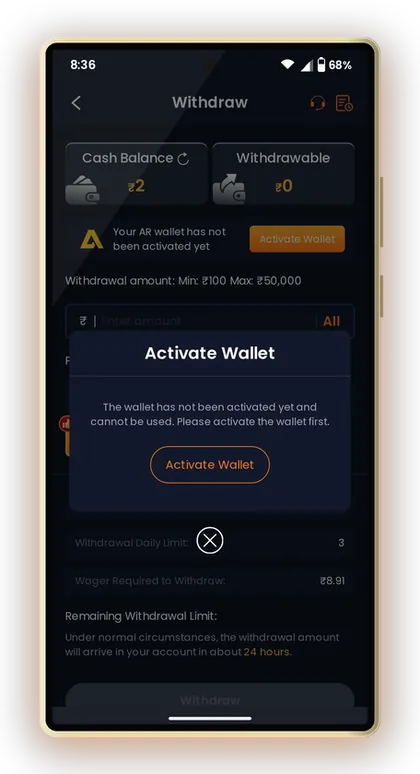
ARPay works only after you activate your AR wallet. Until then the screen shows that the wallet has not been activated and cannot be used, with an Activate Wallet button to start.
Handy Tip: Take a screenshot of your saved bank or UPI details; if a transfer fails, you can compare them quickly with your passbook.
Maan Win Minimum Withdrawal And Maximum Limits
The Maan Win minimum withdrawal is ₹110 for bank and UPI, ₹100 for ARPay and ₹1,000 for USDT. The highest single request is ₹50,000 on bank, UPI and ARPay, while USDT goes up to ₹1,000,000.
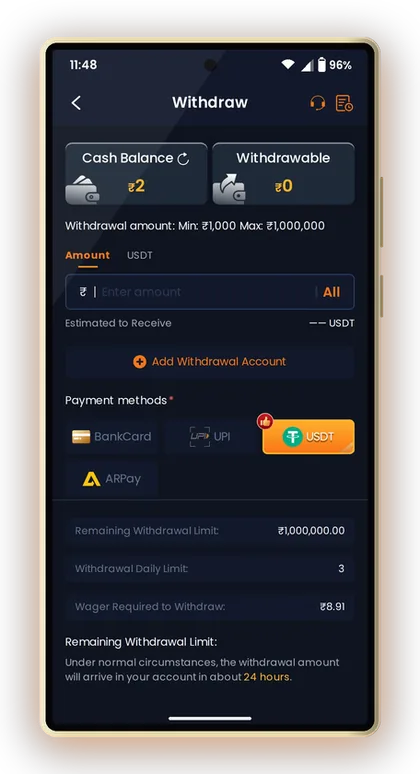
Say your Withdrawable balance is ₹105. That is below the ₹110 UPI and bank minimum, but it clears the ₹100 ARPay minimum if your AR wallet is active. Otherwise, keep playing within your budget or wait until the amount crosses ₹110.
Now say you want to withdraw ₹80,000. Over UPI you would split it into two requests, for example ₹50,000 and ₹30,000, using 2 of your 3 daily chances. With USDT it can go in one request, as long as you are comfortable handling crypto.
| Method | Minimum | Maximum | Requests Per Day | Usual Arrival |
|---|---|---|---|---|
| UPI | ₹110 | ₹50,000 | 3 | About 24 hours |
| BankCard | ₹110 | ₹50,000 | 3 | About 24 hours |
| ARPay | ₹100 | ₹50,000 | 3 | About 24 hours |
| USDT | ₹1,000 | ₹1,000,000 | 3 | About 24 hours |
Handy Tip: Limits can change, so read the Min and Max line on the withdraw screen each time before you type an amount.
UPI, Bank, USDT Or ARPay: Which Method Should You Choose?
All four methods share the same arrival estimate and the same 3 requests a day, so the real choice depends on your amount and how comfortable you are with each one. For most players in India, UPI is the simplest place to start.
UPI For Everyday Amounts
UPI suits withdrawals from ₹110 up to ₹50,000. The money lands in the bank account linked to your UPI ID, and you can see it in your UPI app history without logging in anywhere else.
Bank Card For A Direct Transfer
BankCard has the same ₹110 to ₹50,000 range and sends money straight to your account through its IFSC. Pick it if your UPI ID changes often or if you prefer to see the credit directly in your passbook.
USDT For Large Amounts
USDT starts at ₹1,000 and goes up to ₹1,000,000 per request. The screen shows an Estimated to Receive figure in USDT, so check it before you confirm. Only choose USDT if you already know how to hold crypto safely and convert it later.
ARPay For Small Balances
ARPay has the lowest minimum at ₹100, which helps when your balance sits just under ₹110. Remember to activate the AR wallet first, ideally before you need it, so you are not stuck setting it up while waiting to withdraw.
Handy Tip: Use one main method for most withdrawals; switching often means more saved accounts to check and more chances for a wrong detail.
Maan Win Withdrawal Time: When Your Money Should Arrive
As per the Wallet page, funds are usually added within 2 hours, though the wait can stretch to 24 hours at most. The withdraw screen itself mentions roughly 24 hours as the usual time, so base your planning on the longer number.
The Maan Win withdrawal time depends on review on the platform side and on your bank or UPI provider. A request made late at night or on a bank holiday can take longer to show in your account, even when everything on the platform side is fine.
Here is a practical way to handle the wait. Note the time you submitted, then check your bank or UPI app after 2 hours. If nothing has come after 24 hours, that is the point to raise a Withdrawal Problem ticket, not before.
- Your request is still listed in the Wallet or Balance Record
- The saved bank account, IFSC or UPI ID is correct
- You checked the bank account that is actually linked to your UPI ID
- 24 hours have passed since you submitted the request
Handy Tip: Avoid placing new bets with money you plan to withdraw while a request is pending; keep it simple until the credit arrives.
Maan Win Withdrawal Problem: Common Mistakes And Fixes
Most cases of a Maan Win withdrawal problem come from a few repeat mistakes. Find yours below before you contact support, because many of them you can fix yourself in a few minutes.
The Withdraw Button Does Nothing Or The Request Fails
Check three things: the amount is not below the minimum, it is not above Withdrawable, and the betting requirement line shows nothing left to bet. One of these is the cause in most failed requests.
Also check Remaining Withdrawal Limit. If you have already used your 3 requests for the day on that method, wait until the limit resets.
Wrong IFSC Or Bank Name
A wrong IFSC or bank name can send the transfer back. Use IFSC Modification or Change Bank Name in Self Service to correct it, then submit a fresh request after the change is approved.
Balance Deducted But Money Not Received
First confirm in your bank statement or UPI history, not just in notifications. If 24 hours have passed with no credit, pick Withdrawal Problem in Self Service and attach the details it asks for.
For help beyond the form, reach Maan Win customer care through Live Support on your Profile page. If your issue is actually money you added that has not appeared, that is a different case covered under a Maan Win deposit not received.
Handy Tip: Raise one ticket per problem and follow it with Progress Query; multiple tickets on the same issue only slow down the reply.
How To Change Bank, UPI Or USDT Details Through Self Service
You cannot simply overwrite saved withdrawal details. Changes go through the Self Service Center, where you pick the right problem type and submit it for review by a customer service specialist.
You can choose from IFSC Modification, Delete Withdraw Bank Account and Rebind, Delete UPI and Rebind, Delete Old USDT Address and Rebind, and Change Bank Name. Select the one that fits your issue precisely, because if a request is filed under an incorrect category, it may be rejected and returned to you.
- Log in and open Profile.
- Tap Live Support and open the Self Service Center.
- Choose the option that matches your change, such as Delete UPI and Rebind.
- Fill in the details asked and submit the request for review.
- Tap Progress Query to see the result of your request.
- Once approved, add the new account through Add Withdrawal Account and withdraw as usual.
Handy Tip: Make the change before you need the money; a pending account change and a pending withdrawal at the same time causes confusion.
Keeping Your Maan Win Withdrawal Safe
Your withdrawal is only as safe as your login. Never share your password with anyone, including people who message you claiming to be from support, and use Account & Security on the Profile page to keep your password strong.
There is no Maan Win Hack. Apps or Telegram groups that promise to predict results or unlock extra withdrawals are scams built to steal your login or ask you for a fee. Game results are random, and no tool changes that.
Rely only on the official Telegram and WhatsApp channels linked inside the app for news and updates. Gaming with real money is strictly for adults aged 18+, rules differ from one Indian state to another, and you should stake only what you can afford to lose.
- Your withdrawal account is in your own name
- You have never shared your password or OTP
- You ignore anyone selling hacks or prediction tools
- You set a playing budget and withdraw wins instead of replaying them
Handy Tip: Decide a withdrawal target before you start playing, and when you reach it, withdraw first and play later.
Common Player Questions
What is the Maan Win minimum withdrawal?
The minimum is ₹110 for UPI and bank card, ₹100 for ARPay and ₹1,000 for USDT. Always check the Min line on the withdraw screen before you type the amount, as limits can change.
How long does a Maan Win withdrawal take?
Per the Wallet page, money normally arrives within 2 hours, but it may need up to 24 hours. Since the withdraw screen lists about 24 hours as the usual time, give it one full day before you raise a ticket.
How many times can I withdraw in a day?
Each method allows 3 withdrawals per day. The Remaining Withdrawal Limit line on the withdraw screen shows how many chances you have left.
Why can I not withdraw my full balance?
Only the Withdrawable amount can be sent out, not the full Cash Balance. If the betting requirement line still shows an amount, you need to finish that betting before the locked part becomes withdrawable.
What is the maximum I can withdraw at once?
UPI, bank card and ARPay allow up to ₹50,000 per request. USDT allows up to ₹1,000,000 per request, which suits larger amounts if you are comfortable with crypto.
How do I change my bank account or UPI ID?
Open Live Support from your Profile, go to the Self Service Center and choose the matching option, such as Delete UPI and Rebind or IFSC Modification. Submit it and track the result with Progress Query.
Why does ARPay say my wallet is not activated?
ARPay can be used only after you activate your AR wallet. Tap Activate Wallet on the ARPay screen and finish the setup before you try to withdraw with it.
Do I need an invite code to start withdrawing?
An account is needed to begin, and signing up requires an invite code. Put PUWFKWN in the Invite Code field during registration, and after that you can log in, deposit, play and withdraw in the usual way.
Keep Exploring

Maan Win deposit: add money by UPI, USDT or ARPay from ₹100 to ₹50,000, credited in 1-5 minutes. Steps, bonus chips and

Maan Win customer care number: how to reach Live Support, use the Self Service Center, raise a deposit or withdrawal tic
Maan Win login steps with your +91 number and password, how to reset a forgotten password, fix common login errors and k

Maan Win bonus offers explained: UPI and USDT deposit bonus, Deposit Wheel, daily tasks, Super Jackpot, gift codes and i
Ready To Play On Maan Win?
Register on Maan Win in a minute and explore the games and offers.