
Maan Win App: Install It on Your Phone the Safe Way
The Maan Win app is installed from the download banner on the Maan Win homepage, which reads "Download APP for a Better Experience". On Android you tap it, allow the install once and open the app. On iPhone you can add the mobile website to your Home Screen instead.
Once the app is on your phone, you sign up with a +91 mobile number and the invite code PUWFKWN, which is a required field. After that the app works like the website: the same Wallet, the same games, the same Promo and Earn tabs.
Below you get the exact install steps, what to check before you install, how to avoid fake files, and how to fix the problems new players most often hit in the first ten minutes.
Page Contents
- Download Source
- Maan Win homepage banner
- Invite Code
- PUWFKWN
- Login Details
- +91 mobile number, password
- Game Sections
- Crash, Lottery, Slots, Casino, more
- Payment Methods
- UPI, USDT, ARPay
- Support Options
- Self Service, Live Support
How To Complete The Maan Win Game Download On Android
The Maan Win Game Download link sits on the Maan Win homepage as a banner called Download APP for a Better Experience, just below the Featured Games area. That banner is the one source worth trusting. Files shared in Telegram groups, YouTube comments or random APK sites may look the same but can carry changed code.
Android treats any app from outside the Play Store as an unknown app. That is why your phone shows a warning during install. The warning is normal for this kind of file; what matters is that the file came from the homepage you opened yourself, not from a link someone forwarded.
Most install failures come from one small thing: people tap the banner, the file downloads, and they never open it. Check your notification bar or the Downloads folder in Chrome. The file sits there until you tap it.
- Open Chrome on your Android phone and go to the Maan Win homepage.
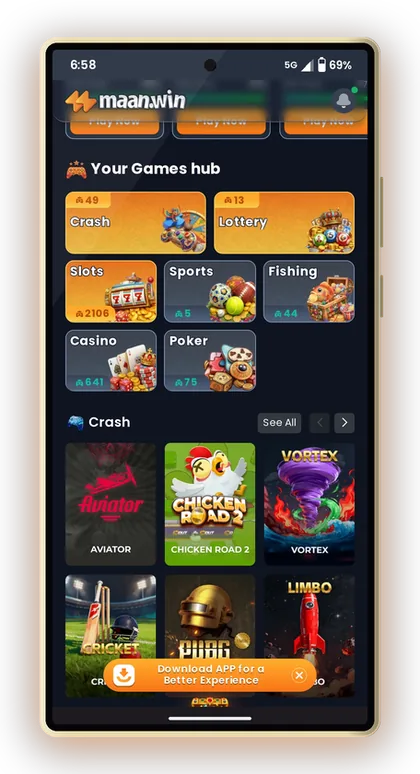
- Scroll down past Popular games and Featured Games to the Download APP for a Better Experience banner and tap it.
- If Chrome says the file may be harmful, tap Download anyway only because you started it from the homepage.
- Open the downloaded file from the notification bar or Chrome's Downloads list.
- If Android blocks it, tap Settings and allow Install unknown apps for Chrome.
- Tap Install, wait for it to finish, then tap Open.
- Go back to Settings and switch Install unknown apps for Chrome off again.
Handy Tip: Turn the unknown apps permission off after install, so no other file can install itself through Chrome later.
Using Maan Win On iPhone: Home Screen Shortcut
IPhones do not install Android files, so a Maan Win download behaves differently on iOS. If the banner does not give your iPhone an installable app, the practical answer is a Home Screen shortcut to the mobile website. It opens full-screen from an icon and keeps you logged in like an app.
The shortcut uses the same account, the same Wallet and the same games as Android. Nothing about your balance or bonuses changes based on which device you use.
Steps For Safari
Open Safari, not Chrome, and go to the Maan Win homepage. Tap the Share button at the bottom, scroll the menu and pick Add to Home Screen, then tap Add.
A Maan Win icon now sits next to your other apps. Open it from there each time instead of typing the address, which also protects you from typing a lookalike address by mistake.
Why Safari Matters
On iPhone, the Add to Home Screen option is built into Safari's Share menu. Some other browsers on iOS hide it or show it differently, so new players often think the option does not exist.
If Safari says the page cannot be opened, check your mobile data or Wi-Fi first. Then try again later before searching for other links, because search results can include copycat sites.
Handy Tip: Delete any old Maan Win bookmarks once the Home Screen icon works, so you always open the same address.
What You Need Before Installing The Maan Win App
Before you tap the banner, spend one minute on these checks. They decide whether the install and your first login go smoothly or turn into a support ticket.
The two items new players forget most are the invite code and a mobile number they actually control. Registration will not go through without the code, and the +91 number becomes your login ID, so a borrowed SIM is a bad idea.
- Your age must be 18 or above, and real-money games should be legal in your area.
- An Android phone with Chrome, or an iPhone with Safari.
- Some free storage space so the file can download and install.
- Stable mobile data or Wi-Fi during install and the first login.
- An Indian mobile number starting with +91 that you will keep using.
- The invite code PUWFKWN ready to type in the Invite Code field.
- For adding money later, keep a UPI app like PhonePe, Google Pay or Paytm ready, or else a USDT wallet.
Handy Tip: Write down your password before you register; a forgotten password is the most common reason people get stuck on the login screen.
Maan Win Register And Login Inside The App
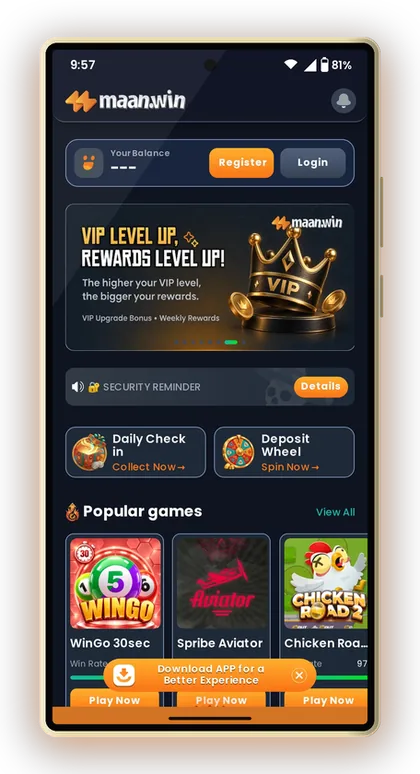
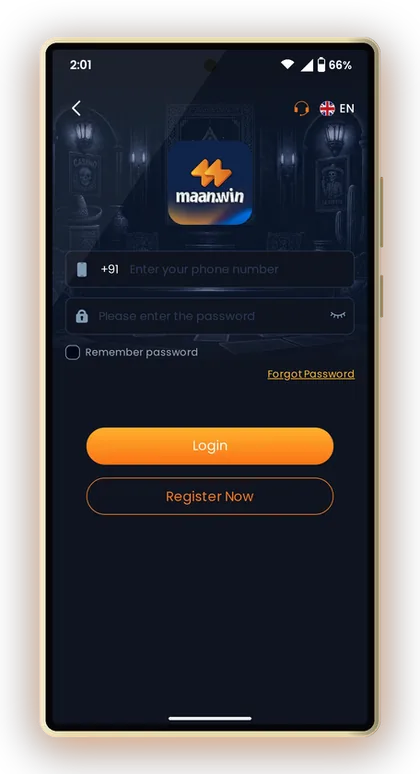
The first app screen you see before signing in shows Register and Login buttons at the top, with a Security Reminder just below. If you are new, tap Register. The Invite Code field is required, and you enter PUWFKWN there.
Many players install the app first and then wonder why sign-up will not finish. Almost every time, the invite code was missing or mistyped. Type it in capitals exactly as shown. For more detail on each field, see the full Maan Win registration steps.
- Open the Maan Win app and tap Register.
- Enter your +91 mobile number.
- Create a strong password and confirm it.
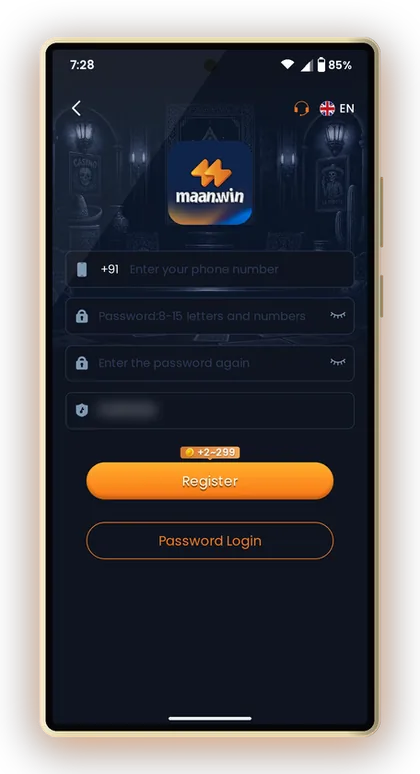
- Enter PUWFKWN in the Invite Code field.
- Finish any verification the screen asks for and submit.
- Return to the login page, then enter your mobile number and password to sign in.
Logging In After Install
The login page asks for your +91 mobile number and password. Tick Remember password on your own phone only, so you do not type it every time. If you forget it, the Forgot Password link sits on the same screen.
If you already registered on the website, do not register again in the app. Just log in with the same number. The Maan Win login help page explains password resets in more detail.
Why One Account Matters
Your bonuses, VIP progress and invite rewards are tied to one account. A second account on the same number or device usually causes trouble later, especially when you try to withdraw money. Keep one account and use it on both the app and the browser.
Handy Tip: Never share an OTP or your password with anyone who says they are from customer care; real support works inside the app.
What The Maan Win App Home Screen Shows After Login
After login, the top of the screen shows Your Balance with Deposit and Withdraw buttons, followed by a welcome banner. Below that are two daily features: Daily Check in with a Collect Now button and the Deposit Wheel with Spin Now.
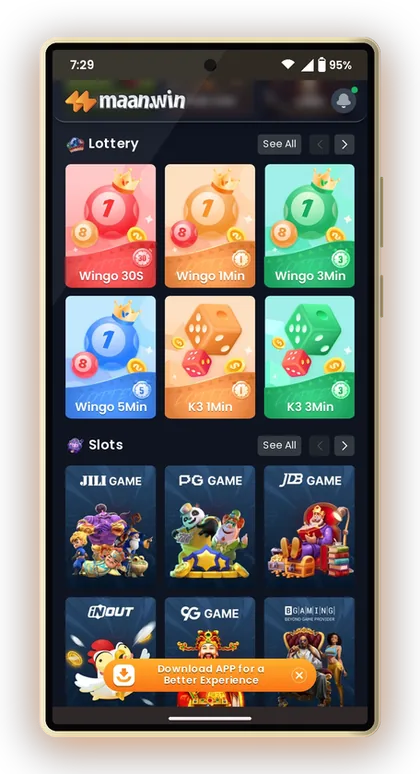
Keep scrolling down and you will come across a Popular games section. It lists WinGo 30sec, Spribe Aviator, Chicken Road 2, Vortex, K3 1 Min, Cricket, 5D 1 Min, Mines, Moto Racing, Super Ace, Lucky Neko and more, with a separate Play Now button placed against each game.
The Games Hub
The Your Games hub splits everything into seven tabs: Crash, Lottery, Slots, Sports, Fishing, Casino and Poker. Lottery holds the WinGo, K3, 5D and TrxWinGo rounds. Poker holds Indian card games like 3 Patti Classic, Rummy, Andar Bahar and Jhandi Munda.
Browse the complete Maan Win games list before you deposit, so you know which game types you actually want to play.
The Bottom Menu
Four tabs sit at the bottom: Home, Promo, Earn and Profile. Promo holds the activity tasks and gift code box. Earn holds Refer & Earn with your own invite code. Profile holds Wallet tools, Game History, Account & Security and Live Support.
Win Rate Labels
Each game tile shows a Win Rate label. Treat it as a display, not a promise. Lottery, crash and slot results are random, and no label changes what the next round will show.
Handy Tip: Start with the slower WinGo 3 Min or 5 Min rounds; fast 30-second rounds make it easy to bet more than you planned.
Making Your First Deposit From The Maan Win App
Tap Deposit at the top of the home screen or open Wallet from Profile. The app offers UPI, which works with PhonePe, Google Pay or Paytm, plus USDT and ARPay. Pick one, choose an amount, then tap Pay now.
For most players UPI is the simple choice: it uses money already in your bank and no crypto steps. USDT suits people who already hold it, since it has its own amount range. The Maan Win deposit methods and limits page lists the current minimum and maximum for each option.
Two Rules That Prevent Lost Deposits
On the deposit screen, you are cautioned against altering the payment amount and against using a saved QR code or UPI account for several payments. Both warnings are important. Should you change ₹500 to ₹510 in your UPI app, the system might fail to link the payment with your order.
Always start a fresh order from the app for each payment. An old QR code saved in your gallery can point to a closed channel.
If The Balance Does Not Update
Say you pay ₹500 by UPI and the app balance stays the same. First, go back to the deposit page and refresh, as the screen itself advises. If it still has not arrived after 30 minutes, open the Self Service Center and choose Deposit Not Received with your UPI reference number.
Handy Tip: Before you close the payment app, capture a screenshot of the UPI success screen that shows the reference number.
Maan Win App Or Mobile Website: Which Should You Use?
Both give you the same account, games and Wallet. The difference is how you open them and how often you have to log in. On Android, the app is usually quicker to reach and keeps you signed in. The browser is useful on a shared phone or when you do not want to install anything.
A sensible plan: install the app on your own phone, and use the browser only on another device. Log out from any phone that is not yours.
| Point | Android App | Mobile Website |
|---|---|---|
| How you open it | Icon on home screen | Type address or bookmark |
| Install needed | Yes, from homepage banner | No |
| Login | Stays signed in on your phone | May ask again after clearing browser |
| Risk of fake links | Low once installed | Higher if you search each time |
| Best for | Your own phone | Shared phone or iPhone |
Handy Tip: If you share a phone with family, use the browser and log out each time instead of keeping the app signed in.
Common Maan Win App Download Problems And Fixes
Most install problems come from phone settings, not the app. Work through the fixes below before contacting support. They solve the large majority of cases in a few minutes.
If none of these work, open Profile and tap Live Support, or use the Self Service Center. It has ready options such as Game Problems and Change ID Login Password, and you can track your ticket through Progress Query.
App Not Installed Or Parse Error
This usually means the file did not finish downloading. Delete it from Downloads, switch to stable Wi-Fi and tap the homepage banner again. A half-downloaded file never installs, however many times you tap it.
Play Protect Warning
Google Play Protect warns about apps it does not know. Since you took the file from the Maan Win homepage, you can choose to install anyway. If the warning names a file you did not download yourself, cancel and delete it.
Login Fails After Install
Check that the number is entered without an extra 0 after +91. Then check caps lock and spaces in the password. If you registered on the website, use those same details; the app does not need a new account.
App Opens But Games Do Not Load
Close the app fully and reopen it. If games still freeze, clear the app cache in Android Settings, or remove and reinstall from the homepage. Your balance is stored on your account, not on the phone, so reinstalling does not touch it.
Handy Tip: Before reinstalling, make sure you remember your password, because a reinstall signs you out.
Maan Win Hack Apps And Fake Downloads: Stay Safe
There is no Maan Win Hack. Any app, Telegram channel or video that claims to show the next colour or number, or to add free balance, is a scam. These files often steal your login, OTP or UPI PIN, and some ask you to pay a fee for a fake tool.
Results in WinGo, K3, 5D and crash games are random. Nobody outside the platform can see or change the next result. The only safe Maan Win download is the one you start yourself from the homepage banner.
- Never install a file sent to you by a stranger, even if it carries the Maan Win logo.
- Never type your UPI PIN anywhere except inside your own UPI app.
- Ignore anyone asking for money to share a winning pattern or tool.
- Use the Telegram and WhatsApp buttons inside the app's Gift Code page to find the official channels, not search results.
- Set a daily playing budget and stop when it is used, win or lose. Real-money games are for adults 18+ only.
Handy Tip: If you already installed a suspicious file, uninstall it, change your Maan Win password from Account & Security, and check your UPI app for unknown payments.
Updating Or Removing The Maan Win App
When a newer app version is needed, the simplest route is to download again from the same homepage banner and install over the old one. Android normally keeps your login in place. If it asks to uninstall first, do it; your account and Wallet are safe on the server.
To remove the app, press and hold the icon and choose Uninstall. Your balance, history and invite code stay on your account, and you can still log in through the browser.
Handy Tip: Withdraw any money you do not plan to use before you stop playing, rather than leaving it sitting in the Wallet for months.
Common Player Questions
Where do I download the Maan Win app?
Open the Maan Win homepage in Chrome and scroll to the Download APP for a Better Experience banner below Featured Games. Tap it to get the Android file. Avoid files shared in groups or on other sites.
Is the Maan Win apk safe to install?
The file from the homepage banner is the one to use. Android will show an unknown app warning, which is normal for apps from outside the Play Store. Files from strangers or lookalike sites can carry changed code, so never install those.
Can I use Maan Win on an iPhone?
Yes. Open the Maan Win homepage in Safari, tap Share, then Add to Home Screen. You get an icon that opens the mobile website full-screen with the same account and Wallet.
Do I need an invite code to register in the app?
Yes, the Invite Code field is required and sign-up will not complete without it. Enter PUWFKWN exactly as shown in capital letters.
I registered on the website. Do I need a new account in the app?
No. Log in with the same +91 mobile number and password. Creating a second account can cause problems with bonuses and when you withdraw money.
Will reinstalling the app delete my balance?
No. Your balance, game history and invite rewards are stored on your account, not on the phone. You only need to log in again after reinstalling.
Is there a Maan Win hack or prediction app?
No. Game results are random and no outside app can see or change them. Anything claiming to do so is a scam that may steal your login or UPI details.
Who do I contact if the app does not work?
Open Profile and tap Live Support, or use the Self Service Center. It has options like Game Problems and Deposit Not Received, and you can follow your ticket through Progress Query.
Keep Exploring
Maan Win register steps for India: sign up with your +91 mobile number, enter invite code PUWFKWN, set a safe password a
Maan Win login steps with your +91 number and password, how to reset a forgotten password, fix common login errors and k

Maan Win games explained: Win Go, K3, 5D, Aviator, Chicken Road 2, Mines, slots, fishing, live casino and poker, with ti
Maan Win deposit: add money by UPI, USDT or ARPay from ₹100 to ₹50,000, credited in 1-5 minutes. Steps, bonus chips and
Ready To Play On Maan Win?
Register on Maan Win in a minute and explore the games and offers.