
Maan Win Login: Sign In With Your Mobile Number and Password
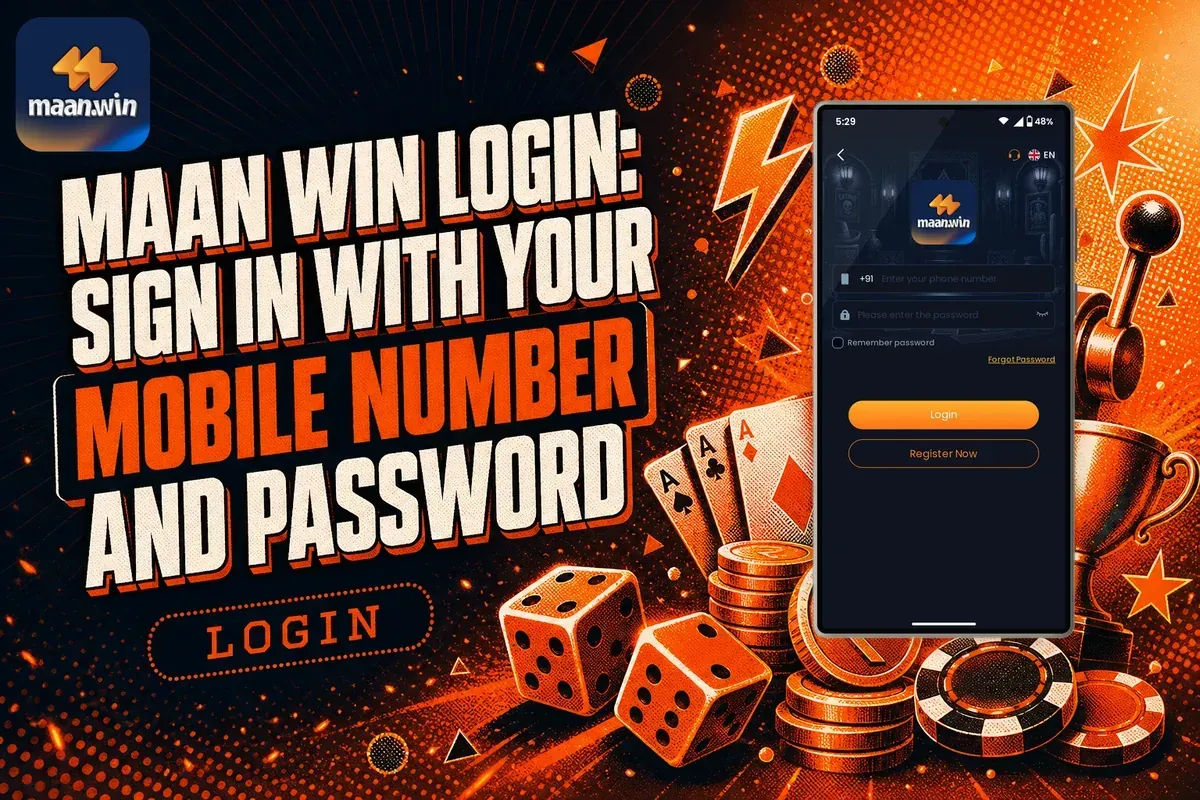
The Maan Win login uses two details: your +91 mobile number and the password you set when you registered. Open the app or the maan.win website, tap Login, enter both and tap the Login button. Once you are in, Your Balance appears at the top of the homepage with Deposit and Withdraw buttons.
Most failed logins come from three causes: a number typed in the wrong format, a forgotten password, or a fake page that only looks like Maan Win. Each one has a clear fix, from the Forgot Password link to the Self Service Center in customer care.
Haven't registered yet? Login is not possible before you create an account, and the registration form asks for an invite code. Type PUWFKWN into the Invite Code box, and after that return here to log in. You can begin on the Maan Win home page and press Register.
Page Contents
- Login ID
- Your +91 mobile number
- Forgot Password
- Link on the login page
- Change Password
- Profile, then Account & Security
- Saved Login
- Remember password option
- Login Help
- Self Service Center
- Invite Code
- PUWFKWN
How To Login To Maan Win Step By Step?
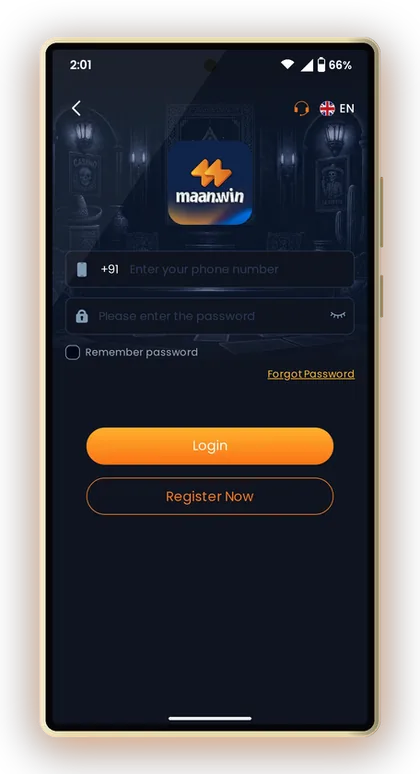
The login page asks for only two things: your mobile number next to the +91 code and your password. There is no separate username, so the number you used at sign-up is your login ID for the rest of your time on Maanwin.
Type the number as 10 digits, without a 0 or +91 in front, because the country code is already shown. Adding it twice is one of the most common reasons a perfectly good account shows an error.
If you use a browser, check the address bar before you type your password. The real site carries the maan.win name. A link forwarded by a stranger in a chat group can open a copy of the page that only exists to collect passwords.
- Open the Maan Win app or the maan.win website on your phone.
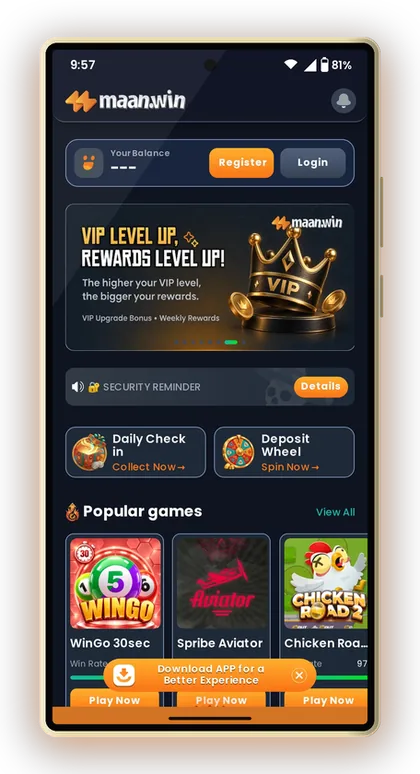
- On the homepage, tap Login. When you are logged out, the top area shows Register and Login instead of your balance.
- Enter your 10-digit mobile number in the field beside +91.
- Enter the password you created during registration.
- Tick Remember password only if the phone is yours and has a screen lock.
- Tap the Login button.
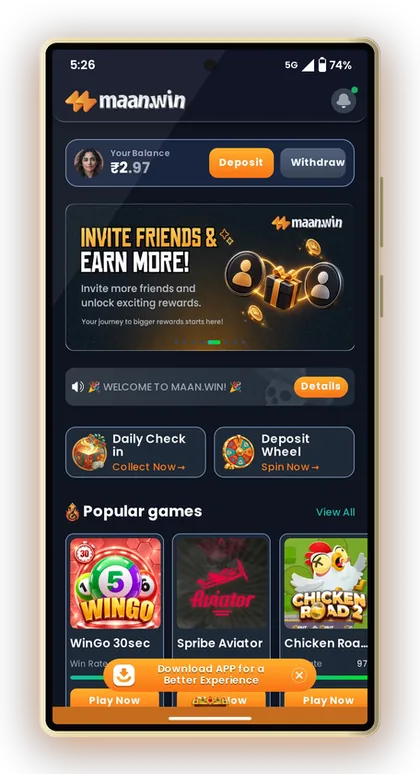
- Check that Your Balance, Deposit and Withdraw now show at the top of the homepage.
Handy Tip: If the Login button does nothing, close the app fully and reopen it before retyping your details; a stuck page is a more common cause than a wrong password.
What You Need Before Your Maan Win Login
The login page only works for numbers that already have an account. If you have never signed up, the system has no record of your number, and no amount of retrying will get you in.
Sign-up takes a few minutes, but one field trips up new players: the Invite Code. It is required, and the Maan Win invite code to enter is PUWFKWN. The full sign-up steps are on the Maan Win register page, and after that the login steps above work straight away.
Keep the registered SIM handy. Since your number is your login ID, people who changed numbers often try the new one and wonder why the account looks empty or missing. Always log in with the exact number you registered.
- A registered account created with invite code PUWFKWN
- The exact mobile number used at registration
- Your password, typed with the same capital and small letters
- Working mobile data or Wi-Fi
- The latest app version or an updated mobile browser
Handy Tip: Write your registered number and a password hint somewhere private the day you sign up, so you are never guessing which number or password you used.
What The Screens Show Before And After Login
The homepage looks almost the same whether you are logged in or not, which confuses many new players. The top area is the part that changes, and it tells you at a glance whether your login worked.
The Homepage When You Are Logged Out
Before login, the top of the homepage shows Register and Login buttons where your balance would be, with a Security Reminder banner below. You can still see Popular games such as WinGo 30sec, Spribe Aviator and Chicken Road 2, but playing with real money needs an account.
Tap Details on the Security Reminder once. Notices like this on gaming apps usually warn about fake links and people who ask for your password, and those are exactly the traps that empty accounts.
The Homepage After Login
Once you are in, the same spot shows Your Balance with Deposit and Withdraw buttons, and the banner changes to a welcome message for MAAN.WIN. Daily Check in and Deposit Wheel sit just below it.
If you still see Register and Login after tapping the button, the session did not save. Log in again and watch for an error message rather than assuming the app is down.
The Profile Page
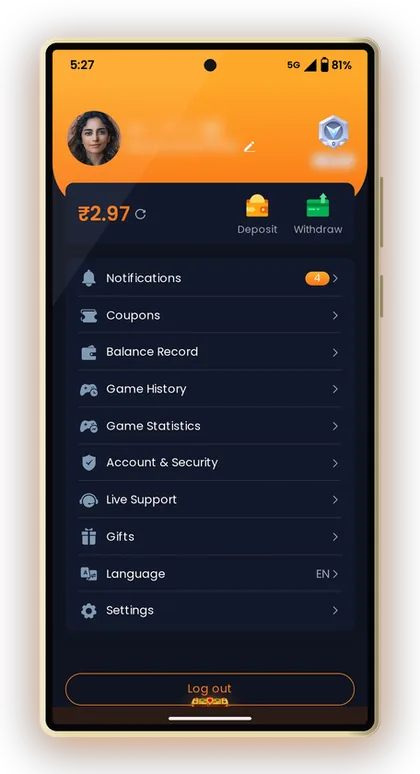
Tap Profile in the bottom menu to reach your account page. It holds Notifications, Balance Record, Game History, Account & Security, Live Support, Settings and the Log out button.
Most players never touch Log out on their own phone, and that is fine. On a shared or borrowed phone, though, tap it every time before you hand the phone back.
Maan Win Forgot Password and Password Change
Password trouble is the single biggest reason players get stuck at the login screen. The platform gives you three ways to deal with it, depending on whether you remember your current password or not.
Using The Forgot Password Link
The Forgot Password link sits on the login page next to Remember password. Tap it and follow the check the app asks for to set a new password; the exact verification step can change, so do what the screen shows.
Choose a new password you have not used on any other app. When one website leaks passwords, criminals try the same number and password on gaming and payment apps first.
Changing Your Password After Login
If you know your current Maan Win login password but want a stronger one, go to Profile and open Account & Security. Change it at once if you ever typed it on a friend's phone or shared a screenshot that showed it.
A good password here mixes letters and numbers and is not your name, birth year or mobile number. Those are the first guesses anyone tries.
When The Reset Does Not Work
The customer service Self Service Center has an option called Change ID Login Password. Select it, fill in what it asks and submit it for review, then use Progress Query to see the result.
Submit one request and wait. Sending the same request again and again does not speed it up and can make the review slower to sort out.
Handy Tip: After any password change, log out and log back in once with the new password so you know it works before you actually need it.
Maan Win App Login Vs Mobile Website Login
Your account is the same on both: one mobile number, one password, one balance. The difference is how easily you stay logged in and how safe the route to the login page is.
The homepage itself shows a Download APP for a Better Experience banner. For daily players the app is usually the better choice, because you open it from your home screen instead of typing or searching for an address each time. Get the file from the Maan Win app download page rather than from a random group link.
The mobile website suits you if your phone is low on storage or you play only now and then. The trade-off is that browsers clear saved logins when you clear data, and searching for the site each time raises the risk of landing on a lookalike page.
| Point | App | Mobile Website |
|---|---|---|
| How you open it | Icon on your home screen | Type maan.win in the browser |
| Staying logged in | Remember password keeps you in on your phone | Lost when browser data is cleared |
| Risk of fake pages | Low once installed from a trusted link | Higher if you open links from chats |
| Phone storage | Needs some space | Needs no extra space |
| Same account and balance | Yes | Yes |
Handy Tip: Never install a Maan Win app file sent by a stranger on Telegram or WhatsApp; fake app files are a common way to steal login details.
Common Maan Win Login Problems And Fixes
Most login errors are small typing issues, not account problems. Before you contact anyone, go through the table below, because the fix usually takes less than a minute.
Here is a common case. Say you set your password as rahul88 on one phone, and your new phone keyboard types Rahul88 because it capitalises the first letter. The app sees a different password. Turn off auto-capitals or check the first letter before tapping Login.
Another frequent one: you log in fine, but the balance looks wrong. That is not a login fault. Open Balance Record on the Profile page to see every credit and debit before you assume money is missing.
| Problem | Likely Cause | What To Do |
|---|---|---|
| Account not found | Number typed with 0 or +91, or never registered | Type 10 digits only; if new, register with PUWFKWN |
| Wrong password | Auto-capital letter, old password, or caps lock | Retype slowly, then use Forgot Password |
| Page keeps loading | Weak network or old app version | Switch between data and Wi-Fi; update the app |
| Logged out every time | Remember password not ticked, or browser clearing data | Tick it on your own phone or use the app |
| Balance looks wrong after login | Pending transaction or wrong account | Check Balance Record on the Profile page |
| Reset still fails | Verification not completing | Use Change ID Login Password in Self Service |
Handy Tip: Try your password once more after a short pause instead of tapping Login many times in a row; repeated fast attempts rarely help.
Getting Help With Maan Win Login Issues
When the quick fixes fail, the Self Service Center is the place to go. It has a FAQ section with a LOGIN PROBLEM category and a Self Service list that includes Change ID Login Password, Deposit Not Received and Withdrawal Problem.
Live Support sits on the Profile page, which means you need to be logged in to use it. If you are locked out, work through the Self Service options and the Maan Win customer care details instead.
The gift code page also points to official Telegram and WhatsApp channels. Use them for news and bonus posts only. Nobody genuine from support will ask you for your password in a chat, so treat any such request as a scam.
- Open the Self Service Center in customer service.
- Pick the option that matches your problem, such as Change ID Login Password.
- Fill in the details asked and submit the request for review.
- Wait for the specialist to handle it; do not send duplicate requests.
- Tap Progress Query to check the result of your request.
Handy Tip: Keep a screenshot of the error message you see; it makes your request much easier for the support team to understand.
Keep Your Maan Win Account Safe
Your login is the only lock on your balance, so treat your password like a UPI PIN. Anyone who has it can log in from any phone, play with your money and change your withdrawal details.
Be clear about one thing: there is no Maan Win Hack. Apps, groups and videos that promise a hack, free balance or guaranteed results are scams. They either ask for your login details or a fee, and players who share their password with them usually lose the account.
Outcomes in games like WinGo, Aviator or Chicken Road come down to chance, and no external tool is able to alter them. Play only when you are 18 or above, fix a budget that you can afford to lose, and quit once that money is finished.
- Never share your password or any verification code, even with friends or someone claiming to be support
- Use a password you do not use on any other app
- Log out on shared or borrowed phones
- Open the site only by typing maan.win or from the installed app
- Change your password at once if anything in Balance Record looks unfamiliar
Handy Tip: Real-money games carry real risk; if you notice yourself chasing losses, take a break and do not log in again until you have set a fresh budget.
What To Do After Your First Maan Win Login
The first login is the right moment to set up the things you will need later. Players who skip this often find out only at withdrawal time that their bank or UPI details are missing or wrong.
Go to Withdraw and use Add Withdrawal Account to save a bank card, UPI ID, USDT address or ARPay. Check the name and IFSC carefully, since fixing them later means a Self Service request like IFSC Modification or Change Bank Name. Read how a Maan Win withdrawal works before your first request.
Then look at your Wallet so you know the difference between Cash Balance and Withdrawable. Daily Check in on the homepage is worth a tap each time you log in, but treat any bonus as extra, not as part of your playing budget.
- Save your withdrawal account with the correct name and details
- Check Cash Balance and Withdrawable in your Wallet
- Open Balance Record once so you know where to find it
- Tap Daily Check in on the homepage
- Decide your playing budget before you deposit
Handy Tip: Save your withdrawal details before your first deposit, not after a win, so a typo cannot hold up your money when you want it.
Common Player Questions
What details do I need for Maan Win login?
You need the mobile number you registered with, typed as 10 digits beside the +91 code, and your password. There is no separate username. If either detail is wrong, the login will not go through.
Can I log in without registering first?
No. The login page only accepts numbers that already have an account. Register first and enter the invite code PUWFKWN in the Invite Code field, which is required to complete sign-up.
What should I do if I forgot my Maan Win password?
Tap Forgot Password on the login page and follow the check the app shows to set a new password. If that does not work, use the Change ID Login Password option in the Self Service Center and track it with Progress Query.
How do I change my password after logging in?
Choose Profile from the menu at the bottom and go into Account & Security. Create a fresh password that is not used on any other site or app. Sign out and sign in again one time to check that it works.
Why does it say my password is wrong when I know it is correct?
The usual cause is a capital letter added by your phone keyboard, caps lock, or an older password you changed earlier. Retype it slowly and check the first letter. If it still fails, reset it with Forgot Password.
Is there a Maan Win Hack that gives free money or sure wins?
No. Any app, video or group offering a Maan Win Hack is a scam, usually aimed at stealing your login details or charging a fee. Game results are random and cannot be changed by outside tools.
Is the login the same on the app and the mobile website?
Yes. You use the same mobile number and password, and you see the same balance on both. The app keeps you logged in more easily, while the browser may log you out when its data is cleared.
Should I tick Remember password?
Tick it only on your own phone that has a screen lock. On a shared or borrowed phone, leave it unticked and tap Log out on the Profile page when you finish.
Keep Exploring
Maan Win register steps for India: sign up with your +91 mobile number, enter invite code PUWFKWN, set a safe password a

Maan Win App download for Android and iPhone: install it safely, register with invite code PUWFKWN, log in and fix commo

Maan Win customer care number: how to reach Live Support, use the Self Service Center, raise a deposit or withdrawal tic
Maan Win withdrawal steps for UPI, bank card, USDT and ARPay, with minimum amounts, daily limits, usual withdrawal time
Ready To Play On Maan Win?
Register on Maan Win in a minute and explore the games and offers.